ListWidget
Detailed Description
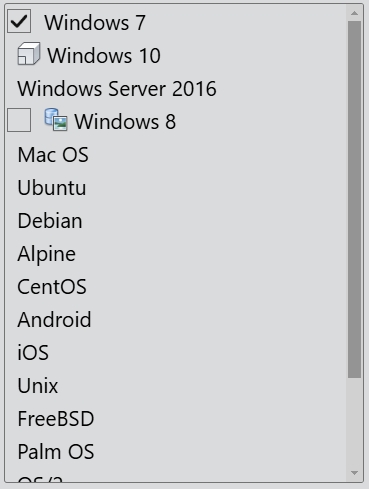
The ListWidget class provides a list display.
An item can be added with add() or insert(). To clear a list widget with clear() and remove individual items with remove().
The list of selected items is returned by the selected property. The selectionMode property of a list widget determines how many of the items in the list can be selected at the same time. The SelectionMode enum indicates how the view responds to user selections:
| Constant | Value | Description |
|---|---|---|
| NoSelection | 0x0000 | Items cannot be selected. |
| SingleSelection | 0x0001 | When the user selects an item, any already-selected item becomes unselected. |
| MultiSelection | 0x0002 | When the user selects an item in the usual way, the selection status of that item is toggled and the other items are left alone. |
| ExtendedSelection | 0x0003 | When the user selects an item in the usual way, the selection is cleared and the new item selected. However, if the user presses the Ctrl key when clicking on an item, the clicked item gets toggled and all other items are left untouched. If the user presses the Shift key while clicking on an item, all items between the current item and the clicked item are selected or unselected, depending on the state of the clicked item. |
| ContiguousSelection | 0x0004 | When the user selects an item in the usual way, the selection is cleared and the new item selected. However, if the user presses the Shift key while clicking on an item, all items between the current item and the clicked item are selected or unselected, depending on the state of the clicked item. |
ListItem
The ListItem class is a single item in a list widget. List items are typically used to display text and an icon, and it can be checked, unchecked with the checkable property. The checked property indicates the item's current check state.
Event
The item click event is emitted with the specified item when a mouse button is clicked on an item in the widget.
The item double click event is emitted with the specified item when a mouse button is double clicked on an item in the widget.
The item context menu event is emitted with the specified item when a mouse button is right clicked on an item in the widget.
The selection change event is emitted whenever the selection changes.
// Listen for the item click event
listWidget.bind('itemClicked', (event: ItemClickEvent): void => {
    event.item as ListItem; // The list item is clicked.
    event.point; // The position of the mouse pointer relative to the top-left corner of the page.
});
// Listen for the item double click event
listWidget.bind('itemDoubleClicked', (event: ItemDoubleClickEvent): void => {
    event.item as ListItem; // The list item is double clicked.
    event.point; // The position of the mouse pointer relative to the top-left corner of the page.
});
// Listen for the item context menu event
listWidget.bind('itemContextMenu', (event: ItemContextMenuEvent): void => {
    event.item as ListItem; // The list item is right clicked.
    event.point; // The position of the mouse pointer relative to the top-left corner of the page.
});
// Listen for the selection change event
listWidget.bind('selectionChanged', (): void => {
    // The selection changes.
});
Example code
In the code below, you will create a list widget:
const desktop = Desktop.instance();
const listWidget = new ListWidget(desktop);
listWidget.size = new Size(240, 320);
const item1 = new ListItem(listWidget, 'Windows 7');
item1.checkable = true;
item1.checked = true;
new ListItem(listWidget, 'Windows 10', 'orthographic.png');
new ListItem(listWidget, 'Windows Server 2016');
const item2 = new ListItem(listWidget, 'Windows 8', 'appearence.png');
item2.checkable = true;
new ListItem(listWidget, 'Mac OS');
new ListItem(listWidget, 'Ubuntu');
new ListItem(listWidget, 'Debian');
new ListItem(listWidget, 'Alpine');
new ListItem(listWidget, 'CentOS');
new ListItem(listWidget, 'Android');
new ListItem(listWidget, 'iOS');
listWidget.addItem('Unix');
listWidget.addItem('FreeBSD');
listWidget.addItem('Palm OS');
listWidget.addItem('OS/2');
listWidget.addItem('RedHat');
listWidget.addItem('Solaris');
listWidget.addItem('Chrome OS');